Making Your Restaurant Accessible for Visually Impaired Guests
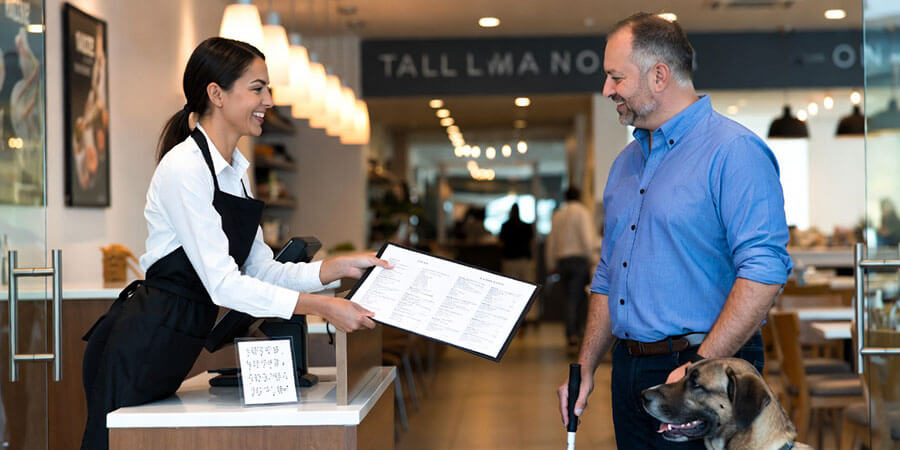
Table of Contents
Practical Steps to Create a Welcoming Dining Experience for Guests With Vision Loss or Low Vision
An estimated 12 million Americans aged 40 and older have some form of vision impairment, according to the Centers for Disease Control and Prevention. When you include all age groups and varying degrees of visual difficulty, that number climbs significantly. For restaurant operators, this represents a sizable group of potential guests who may avoid dining out because too many establishments overlook their needs.
Most accessibility improvements for visually impaired guests are straightforward, affordable, and benefit all diners. Better lighting helps everyone read menus. Well-trained staff provide better service across the board. Making your restaurant genuinely accessible is both a legal obligation under the Americans with Disabilities Act and a smart business decision that expands your customer base.
Understanding ADA Requirements for Restaurants
Title III of the Americans with Disabilities Act requires that restaurants and other places of public accommodation be accessible to individuals with disabilities, including those with visual impairments. This is not optional - it applies to virtually every restaurant, regardless of size or age of the building.
Physical accessibility under the ADA includes maintaining clear pathways, providing adequate lighting, and ensuring signage meets specific standards. Restroom signs, for example, must include raised characters and braille under ADA guidelines. Exit signs and other critical wayfinding elements must meet contrast and visibility standards.
Communication accessibility means you must be able to effectively communicate with guests who have visual impairments. This can include offering menus in alternative formats, verbally describing specials, or providing other reasonable accommodations upon request.
Digital accessibility is an evolving area. Courts have increasingly ruled that restaurant websites and online ordering platforms fall under ADA requirements, particularly when they serve as a gateway to the physical establishment.
Non-compliance carries real consequences - ADA lawsuits against restaurants have increased steadily, and settlements frequently reach into the tens of thousands. Beyond legal risk, inaccessible restaurants simply lose customers. For a comprehensive overview of ADA obligations, our Americans with Disabilities Act regulations guide covers everything restaurant operators need to know.
The Business Case for Visual Accessibility
Accessibility is often framed as a compliance issue, but it is equally a growth opportunity. The American Foundation for the Blind reports that people with vision loss and their families represent billions in annual spending power. When a visually impaired guest has a positive experience, they share it - and the visually impaired community is tightly networked through advocacy groups and assistive technology forums.
Word-of-mouth impact is amplified in the disability community. Restaurants known for genuine accessibility earn loyal, repeat customers who actively recommend the establishment.
Inclusive design benefits everyone. Better lighting, clearer signage, more attentive service, and uncluttered pathways create a more comfortable experience for elderly diners, guests with temporary injuries, families with children, and anyone unfamiliar with your layout.
Competitive differentiation matters in a crowded market. Few restaurants go beyond bare-minimum ADA compliance to create a genuinely welcoming experience for visually impaired guests. A strong reputation for accessibility can become part of your restaurant marketing strategy and a genuine point of difference in your community.
Physical Layout and Environment
Small adjustments to lighting, contrast, pathways, and furniture placement can dramatically improve navigation and comfort for visually impaired guests.
Entrance and Exterior
Ensure the main door has a tactile indicator or contrasting color that distinguishes it from surrounding walls. If you have steps, provide a handrail and consider tactile warning strips at the edge of each step. Keep the entrance area free of sandwich boards, planters, or other obstacles that shift position day to day.
Lighting
Lighting is one of the most impactful and least expensive accessibility improvements. Many visually impaired individuals retain some usable vision, and appropriate lighting makes a significant difference. Aim for even, consistent lighting throughout the restaurant - avoid dramatic shifts between bright and dark areas, which force the eyes to constantly readjust. Task lighting at tables helps with menu reading, and avoiding harsh glare from uncovered bulbs or reflective surfaces is particularly important for people with low vision.
Contrast and Color
High contrast between surfaces helps guests with low vision distinguish boundaries and objects. Use contrasting colors between floors and walls, between table surfaces and place settings, and between steps and landings. A dark table with light plates, or vice versa, helps guests locate their dining items. Consider the contrast on your tabletop settings - this simple detail makes a real difference.
Pathways and Furniture Arrangement
Maintain clear, consistent pathways between the entrance, host stand, dining areas, and restrooms. Consistency is critical - a visually impaired guest who visits regularly relies on familiar pathways. When you rearrange restaurant furniture, inform your host staff so they can mention layout changes to returning guests who may need guidance. Keep pathways at least 36 inches wide, free of server stations, bus tubs, or temporary obstacles. Always keep wet floor signs in predictable locations and verbally alert nearby guests when they are placed.
| Accessibility Area: | Key Improvements: | Impact Level: |
| Entrance | Contrasting door color, tactile strips on steps, clear of obstacles | High |
| Lighting | Even illumination, task lighting at tables, no harsh glare | High |
| Color contrast | Contrasting tableware, distinct floor/wall boundaries | Medium |
| Pathways | 36-inch minimum width, consistent layout, obstacles removed | High |
| Signage | Large print, high contrast, braille on restroom signs | Medium |
| Furniture | Stable chairs without unexpected protrusions, consistent arrangement | Medium |
Menu Accessibility
The menu is the centerpiece of the dining experience, and for visually impaired guests, an inaccessible menu creates an immediate barrier. Offering multiple menu formats shows that you have thought about diverse needs - and none of these options are difficult to implement.
Braille Menus
Braille menus signal genuine commitment to inclusion. Work with a braille transcription service to create accurate menus and keep at least two copies on hand. Not every visually impaired guest reads braille - literacy rates vary - but having them available sends a powerful message.
Large Print Menus
Large print menus serve guests with low vision, elderly diners, and anyone who forgot their reading glasses. Use a minimum 18-point font with a clean, sans-serif typeface and strong contrast - black text on white or cream paper works best. Avoid decorative fonts or colored paper that reduces readability.
Digital and Audio Menus
QR codes linking to a screen-reader-compatible menu page let guests use their own smartphones to browse offerings independently. The critical requirement is that the linked page must use properly structured HTML with descriptive text - not a PDF image of your menu. Test your digital menu with VoiceOver or TalkBack before deploying it.
Staff-Read Menus
Some guests prefer to have a server read the menu aloud. Train staff to describe items clearly - including main ingredients, preparation method, and notable flavors. Offer to repeat or clarify as needed.
Staff Training for Serving Visually Impaired Guests
Your staff are the most important accessibility tool in your restaurant. Even a perfectly designed space falls short if servers, hosts, and managers do not know how to interact confidently and respectfully with visually impaired guests. Effective customer service training should include specific guidance on serving guests with visual impairments.
Communication Best Practices
Always identify yourself. When approaching a visually impaired guest, say your name and role: "Hi, I'm Sarah, and I'll be your server tonight." Do the same each time you return to the table so the guest knows who is speaking.
Speak directly to the guest. If a visually impaired guest is dining with a companion, always address the guest directly - never ask the companion, "What does she want to order?" This is one of the most common and most alienating mistakes in hospitality.
Ask before helping. Never grab a guest's arm to guide them or assume they need assistance. A simple "Would you like me to guide you to your table?" respects their autonomy. If they accept, offer your elbow - do not push or pull.
Use descriptive language. When placing items on the table, describe what you are putting down and where: "I'm setting your water glass to the right of your plate." For plate orientation, use the clock position method - "Your steak is at six o'clock, vegetables are at two, and the potato is at ten." This universally understood system gives guests a clear mental map of their plate.
Table Service Details
Announce arrivals and departures. Let the guest know when you arrive and when you are leaving - silently walking away is disorienting for someone who cannot see you leave.
Maintain consistent table setup. Place water glasses, silverware, and condiments in the same positions every time so guests can build a reliable mental model of the table.
Describe the food. When delivering dishes, briefly describe the presentation: "This is your grilled salmon with asparagus on the side and a lemon wedge on top."
Handle the check thoughtfully. Offer to read the total aloud. For cash payments, identify each bill denomination when returning change. For card payments, offer to walk the guest through the terminal.
| Do: | Don't: |
| Identify yourself by name each time you approach | Assume the guest remembers your voice |
| Ask "Would you like assistance?" before touching | Grab, push, or pull a guest without asking |
| Speak directly to the guest, not their companion | Talk about the guest in third person |
| Use clock positions to describe plate layout | Say "your food is right there" |
| Announce when you arrive and leave the table | Walk away silently mid-conversation |
| Describe menu items, food presentation, and bill | Assume the guest does not want details |
| Keep table setup consistent across visits | Rearrange items without informing the guest |
| Offer the menu in multiple formats | Provide only a standard print menu |
Training should be part of onboarding for every new employee and refreshed during regular team meetings. For broader strategies on building a well-trained team, see our guides on motivating restaurant staff and leading a restaurant team.
Restroom Accessibility
Restroom navigation can be one of the most stressful parts of dining out for a visually impaired guest. A few targeted improvements make a significant difference.
Clear directions from the dining area to the restrooms are essential. Train staff to offer specific verbal directions: "The restrooms are straight ahead past the bar, about 40 feet, on the left." Offering to walk a guest to the restroom door is appropriate and appreciated - just ask first.
Tactile and braille signage on restroom doors is required under ADA standards. Signs should be mounted at a consistent height on the latch side of the door with raised characters and Grade II braille.
Interior layout matters too. Keep the floor clear of items that shift position and ensure soap dispensers, paper towels, and hand dryers are in consistent locations. Automatic fixtures eliminate the need to locate and operate manual controls. Apply the same even lighting and high contrast principles as your dining room.
Website and Digital Accessibility
Your digital presence is increasingly the first point of contact with potential guests. The Web Content Accessibility Guidelines (WCAG) 2.1 provide the framework for making websites, online menus, and ordering platforms accessible to users with visual impairments.
Screen reader compatibility is the foundation. All images need descriptive alt text, navigation must work with keyboard-only input, and your online menu must be structured text - not an image, which screen readers cannot interpret.
Color contrast on your website should meet WCAG AA standards at minimum - a contrast ratio of at least 4.5 to 1 for normal text.
Online ordering and reservations must be navigable without a mouse. Common barriers include unlabeled buttons, images without alt text, pop-ups that trap keyboard focus, and dropdown menus requiring precise mouse interaction.
Social media and marketing content should also be accessible. Add alt text to images, caption your videos, and use readable fonts in your digital marketing strategies. Accessibility in your online presence signals that your physical restaurant will also be welcoming.
Marketing to the Visually Impaired Community
Once you have made your restaurant accessible, let people know. Targeted outreach to the visually impaired community can build awareness and loyalty.
Partner with local organizations. Connect with state and local agencies for the blind, low vision support groups, and disability advocacy organizations. Offer to host events or provide meeting space - these partnerships create authentic connections that paid advertising cannot replicate.
List your restaurant on accessibility directories. Several online platforms and apps help visually impaired users find accessible businesses. Ensure your restaurant is listed with your accessibility features accurately described.
Highlight accessibility on your website. Mention braille menus, trained staff, and accessible digital ordering on your about page or dining experience description. This helps visually impaired guests feel confident choosing your restaurant.
Gather and act on feedback. Ask visually impaired guests about their experience and what you could improve. This ongoing feedback loop demonstrates genuine commitment to inclusion.
Frequently Asked Questions
Is my restaurant legally required to accommodate visually impaired guests?
Yes. Under Title III of the Americans with Disabilities Act, restaurants are classified as places of public accommodation and must provide equal access to individuals with disabilities, including visual impairments. This includes both the physical space and effective communication - such as offering menus in alternative formats. Non-compliance can result in lawsuits and financial penalties.
What is the clock position method for describing food placement?
The clock position method uses the face of a clock as a reference to describe where items are located on a plate. For example, "your chicken is at six o'clock, rice is at two o'clock, and vegetables are at ten o'clock." This gives the guest a clear spatial map of their meal without requiring them to search for each item. It is the universally recommended method used by orientation and mobility specialists.
How much does it cost to create braille menus?
Braille transcription services vary depending on menu length and complexity, but most restaurants find the investment modest compared to the cost of reprinting standard menus. Menus need updating when offerings change significantly, so restaurants with frequently rotating menus may find large print and digital screen-reader-compatible formats more practical as primary alternatives.
Do I need to make my website accessible too?
Yes, and this is an increasingly enforced area. Federal courts have consistently ruled that restaurant websites fall under ADA requirements, particularly when they offer online ordering, reservations, or serve as a primary point of information. Following WCAG 2.1 AA standards is the recognized benchmark. At minimum, ensure your online menu is structured text - not an image - and that your site is navigable by keyboard and screen reader.
How should staff interact with a guest's guide dog?
Guide dogs are working animals and should not be petted, fed, or distracted by staff. Under the ADA, they must be allowed in all areas where customers are permitted. Provide a clear space under or beside the table for the dog. You may only ask if it is a service animal required because of a disability and what task it has been trained to perform - do not request proof or documentation.
What if a visually impaired guest declines my offer to help?
Respect their decision completely. Many visually impaired individuals are highly independent and have well-developed strategies for navigating new environments. Simply let them know you are available if they need anything and carry on with your normal service. The offer itself is appreciated - the key is accepting their answer gracefully, whether it is yes or no.
How do I make my QR code menus accessible?
Most visually impaired guests can scan QR codes using their smartphone's camera with audio guidance. The critical factor is the linked page - it must be a properly structured web page with clean HTML and heading hierarchy, not a PDF or image. Test the page using your phone's built-in screen reader (VoiceOver on iPhone, TalkBack on Android) to verify it works before deploying.
Related Resources
- Americans with Disabilities Act Regulations Guide - Comprehensive overview of ADA requirements for restaurant operators
- Customer Service Training for Restaurant Staff - Building a team that delivers exceptional service to every guest
- Restaurant Marketing Strategies and Tools - Reaching new audiences and growing your customer base
- Restaurant Furniture - Creating comfortable, accessible dining environments
- Tabletop Supplies - High-contrast place settings and dining accessories
Share This!